This project has been made with the Arduino platform and the RFID tag reader ID-12.
What is es RFID? A brief explanation from Wikipedia:
Radio-frequency identification (RFID) is the use of a wireless non-contact system that uses radio-frequency electromagnetic fields to transfer data from a tag attached to an object, for the purposes of automatic identification and tracking. Some tags require no battery and are powered by the electromagnetic fields used to read them. Others use a local power source and emit radio waves (electromagnetic radiation at radio frequencies). The tag contains electronically stored information which can be read from up to several metres (yards) away. Unlike a bar code, the tag does not need to be within line of sight of the reader and may be embedded in the tracked object.
RFID tags are used in many industries. An RFID tag attached to an automobile during production can be used to track its progress through the assembly line. Pharmaceuticals can be tracked through warehouses. Livestock and pets may have tags injected, allowing positive identification of the animal. RFID identity cards can give employees access to locked areas of a building, and RF transponders mounted in automobiles can be used to bill motorists for access to toll roads or parking.
How to start using the RFID ID-12?
First of all, let’s see it’s datasheet to see how the Integrated Circuit is supposed to work and which pin to use.
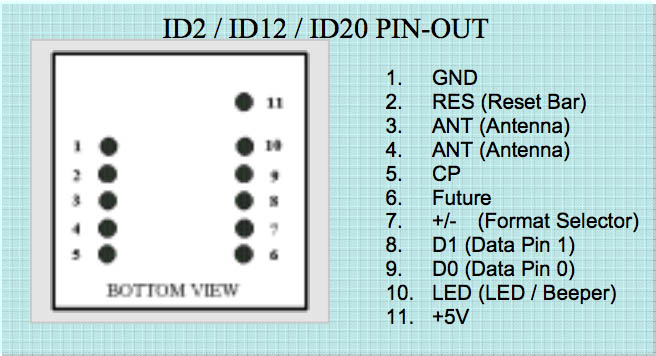
The pins we are interested to make this project are:
- 1 (GND)
- 11 (+5v) to power our project
- 2 (RES) to make the reader work and to implement the RESET feature if desired
- 9 (ASCII out) that will output the id tag.
In this project, there’s no need of resetting the IC because it makes the user to remove the tag from the reader before reading a tag again, if you use the RESET feature, you can read the card again right after you reset it and that’s something we don’t need.
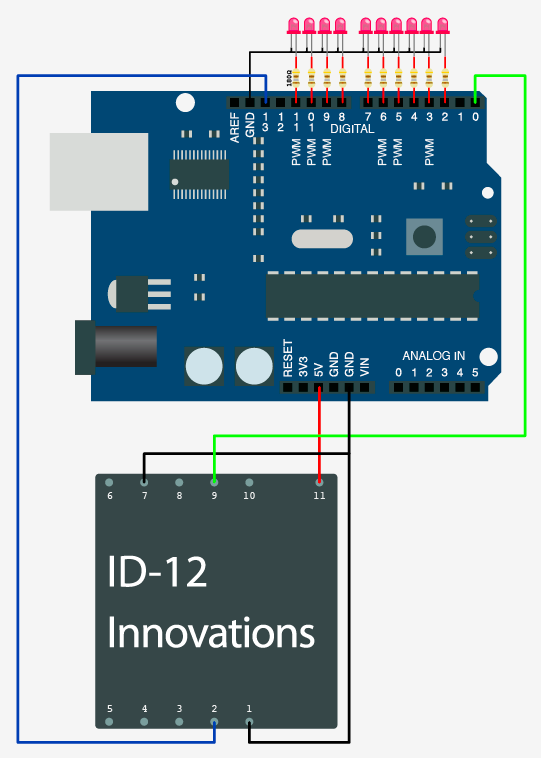
This in an example of how to connect an RFID ID-12 to the Arduino platform, this image is from other proyect, you can check it out in the Bildr.org page.
Now, let’s build the project. To do this, we’ll need a standalone Arduino, to do this and to understand how the arduino works, you can read this guide that has the steps to build an Arduino in a protoboard.
https://docs.google.com/open?id=1Jbk7U8EvlfXlGilfBzxiNpYyaE1KdoI9rVGBtHlXFp2p5rsrh-CHmONo68t_
This guide was created by SparkFun and it’s perfect to replicate the Arduino platform.
In page 6, we’ll find the circuit scheme, from there, we’ll focus in the most important things to make the Arduino run, you don’t need to pay attention to the FTDI, the LED in the 13th pin and the RESET pin and button.
The first thing to do is to give our project a good power source. As the Atmega328 that our Arduino uses and the RFID reader works with 5v, we’ll need an IC (Integrated Circuit) to convert from our power source to 5v, the LM7805 is a 5v voltage regulator that will do the job and as you can see, it’s used in the protoboard assembly with an special configuration of capacitors.
We have to take into consideration what power source will we use, it depends mostly on our electronic lock, in this case, I’ve used a 9v transformer and a diode bridge rectifier to convert from 9v AC to DC.
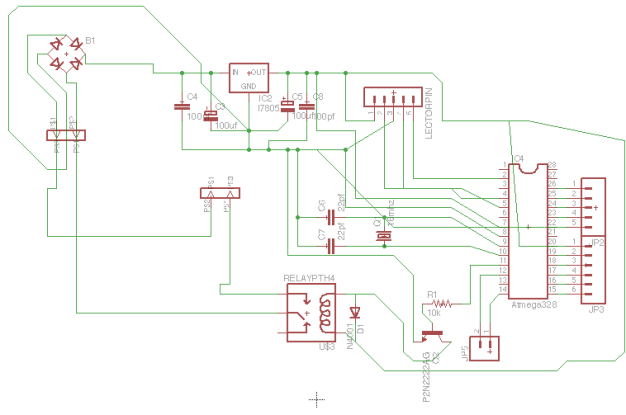
The board circuit:
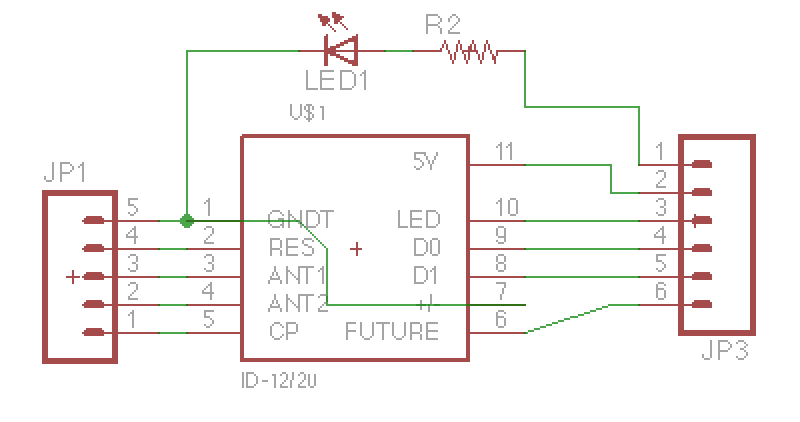
And the tag reader:
The proyect requires the component’s library created by SparkFun, you can download it from: https://github.com/sparkfun/SparkFun-Eagle-Library
Both files, including their respective schematics and the pdf files with the circuits ready to print are available for download and can be modified and used using Eagle.
Each scheme has what components have been used. Download here!
Time to get our hands into the code:1
2
3
4
5
6
7
8
9
10
11
12
13
14
15
16
17
18
19
20
21
22
23
24
25
26
27
28
29
30
31
32
33
34
35
36
37
38
39
40
41
42
43
44
45
46
47
48
49
50
51
52
53
54
55
56
57
58
59
60
61
62
63
64
65
66
67
68
69
70
71
72
73
74//We'll start adding some variables to make the code easier to read and configure
int RFIDResetPin = 2;
int doorPin = 5;
char tagString[14] = "";
char myTag[14] = "434056786236";
int reading = 0;
int index = 0;
int ldPin = 4;
int tempo = 300;
//Let's configure the pins we're going to use. Set the RFID reset pin HIGH, without this, the reader won't work, and set the Serial port to be able to
//read the tags
void setup(){
pinMode(5, OUTPUT);
Serial.begin(9600);
pinMode(RFIDResetPin, OUTPUT);
pinMode(speakerPin, OUTPUT);
digitalWrite(RFIDResetPin, HIGH);
}
//Start looking for tags
void loop(){
readCard();
}
void readCard() {
while(Serial.available()){ //If there are data available to read
char readByte = Serial.read(); //Read bytes one by one
if(readByte == 2) { //If our byte equals 2, it sets the starting point of a tag being read
reading = 1;
index = 0;
}
if(readByte == 3) { //If it is 3, the tag reading has finished
reading = 2;
}
if(reading == 1 && readByte != 2 && readByte != 10 && readByte != 13 && readByte != 3){
tagString[index] = readByte; //Each byte will be placed in our tag buffer
index++;
}
}
if(reading == 2) { //If the reading has ended, compare the tag code with the one that opens the door
if (compareTag(myTag) == true) {
openDoor();
}
reading = 0; //Set the reading to 0 to tell the program that it can read new cards
Serial.flush(); //Delete the Serial buffer to avoid problems
}
}
//This function is not needed
void resetReader(){
///////////////////////////////////
//Reset the RFID reader to read again.
///////////////////////////////////
digitalWrite(RFIDResetPin, LOW);
digitalWrite(RFIDResetPin, HIGH);
delay(250);
}
//Compares two tags
boolean compareTag(char two[]){
if(strlen(tagString) == 0) return false; //empty
for(int i = 0; i < 12; i++){
if(tagString[i] != two[i]) return false;
}
return true; //no mismatches
}
//Opens the door
void openDoor(){
digitalWrite(doorPin, HIGH);
delay(2500);
digitalWrite(doorPin, LOW);
}
And the final result: